
Run a site audit on a website that sits behind Cloudflare and you may find an odd error: a broken page you have never heard of, linked from well over a hundred pages.

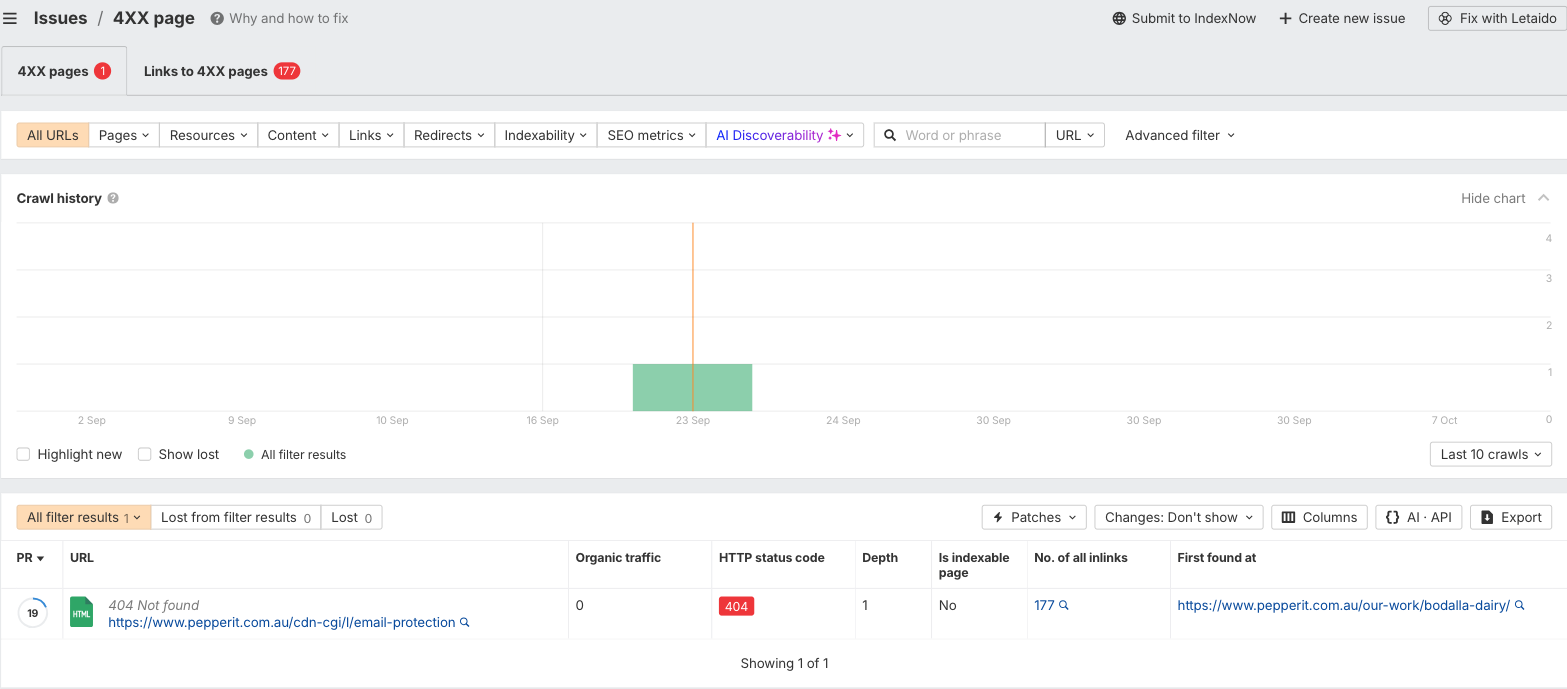
On our own audit, that page was /cdn-cgi/l/email-protection. Ahrefs reported it as a 404 and flagged 177 pages for linking to it. We had not built that page, and we had not linked to it on purpose. Nothing on the site was actually broken.
Here is what was happening, whether it matters, and how to deal with it.
What Cloudflare Is Doing To Your Email Address
Cloudflare has a feature called Email Address Obfuscation. It exists to stop spam bots harvesting email addresses from the pages they crawl, and on many accounts it is switched on by default.
When it is active, Cloudflare rewrites each visible email address in your HTML. Instead of a normal mailto: link, the page contains a link to /cdn-cgi/l/email-protection, followed by a string of encoded characters. Cloudflare also adds a small script, email-decode.min.js, which turns that code back into a working email link once the page loads in a browser.
For a person, this is invisible. The address appears, the link works, and nobody thinks about it again.
Why Your Audit Tool Reports A Broken Page
A crawler does not behave like a person. Ahrefs reads the page, finds a link to /cdn-cgi/l/email-protection, and requests it as an ordinary URL without the decoded part. That request returns a 404, so the tool reports a broken page.
The scale comes from where the email address lives. If it sits in a header or footer, which it usually does, every page that uses that template carries the same link. One quirk becomes 177 errors. In our case it was a single broken URL, reported again on every page that links to it.
How To Tell If It Is Your Site
Three quick checks will confirm it:
- Look at the URL. If the flagged page is /cdn-cgi/l/email-protection, it is almost certainly this.
- Check the source. View the source of a flagged page and search for cdn-cgi. If your email address has been replaced by a link containing it, Cloudflare is rewriting your emails.
- Check the pattern. If the affected pages share a header, footer or contact block, the numbers will line up.
Is It A Real Problem?
Mostly, no. Real visitors are not affected, because their browsers run the decode script. On our site, Search Console returned no data for that URL, so it is not earning impressions or clicks.
There are two small caveats. A visitor browsing with JavaScript switched off would land on a dead link. And at least one performance write-up reports that these URLs can show up as soft 404s in Search Console, so it is worth checking the Page indexing report on your own site.
The bigger cost is noise. False errors bury the real ones, inflate the numbers in a client report, and make a healthy site look messier than it is.
Three Ways To Fix It
1. Turn the feature off. In Cloudflare, go to Security, then Settings, and switch Email Address Obfuscation to Off. Emails become plain mailto: links. The trade-off is that your address is easier for scraper bots to collect, so this suits a published contact address better than a private one.
2. Turn it off selectively. Cloudflare lets you use a configuration rule to disable the feature for specific hostnames. You can also wrap a single address in <!–email_off–> tags to leave it untouched. This keeps the protection where you want it.
3. Tell the audit tool to ignore it. In Ahrefs, open Project Settings, then Site Audit, then Crawl Settings, and add /cdn-cgi to the “Don’t crawl URLs matching the pattern” rule. Nothing you would want to audit lives under that path, so there is little risk of hiding a real problem.
The first two change what your site does. The third only changes what the tool reports.
What We Did
We took the third option. During the audit before the change, Ahrefs flagged the 404 and the 177 pages linking to it. On the audit after, both flags had cleared. The email links on our site are unchanged, so visitors see exactly what they did before.
Which option suits you depends on how much you value the spam protection. If you want the site itself to stop producing the link, options one and two do that. If the link works for your visitors and the tool is the only thing complaining, option three is the lighter touch.

The Takeaway
Audit tools are good at reporting what a crawler sees. They are less reliable at telling you whether it matters. Before chasing a long list of errors, work out what is generating them, and whether fixing them would change anything your visitors notice.
Cloudflare sits between your website and everything that visits it, which is also why it matters for AI visibility, as we covered in AI Is Blocking Ecommerce Visibility. Here’s Why. If you would like a second set of eyes on your audit, or help separating real technical issues from noise, that is a conversation we are always up for.


